
LinkedIn Company Page vs Showcase Page: Key Differences

Most companies set up a LinkedIn Company Page and consider the job done. There is more on the table than that.
Imagine this- You set up your LinkedIn Company Page. Added the logo, the banner, the tagline. Someone from marketing team posts a few times a week. The follower count grows slowly. Leadership occasionally asks why engagement feels flat despite consistent effort.
The honest answer is usually this: one page cannot hold multiple conversations at once without losing coherence.
A sales director researching your enterprise software wants something different from what a developer evaluating your API wants.
An HR professional benchmarking your culture wants something different from what a CFO comparing vendors wants.
When all of them land on the same page and see the same content, most of them find it only partially relevant — and partially relevant content is content people eventually stop following.
Similarly, a customer based in North America has a different journey and content consumption patterns than the one in Europe.
LinkedIn built a solution for exactly this problem. It is called a Showcase Page.
About LinkedIn Showcase Page
A Showcase Page is a child page that sits under your main Company Page. You create it yourself from your admin panel. It has its own followers, its own content stream, its own analytics dashboard. In IRL terms, you can think of it as a branch office or a satellite office.
But it carries your company name — so it inherits your brand credibility while speaking a more focused language to a more specific audience.
Your Company Page is your brand speaking to everyone. Your LinkedIn Showcase Page is your expertise speaking to someone in particular.
A well-built Showcase Page does not try to serve the whole company. It serves one professional community — the accountants who use your finance product, the developers who build on your platform, the HR leaders who rely on your people management tools. Thus, in the case of LinkedIn Showcase page, specificity is not a limitation.
Where LinkedIn Affiliated Pages fit in
When you look at a large company’s LinkedIn profile and see a column of linked pages, not all of them were created the same way or for the same purpose.
Showcase Pages are editorial tools — built by you, from your admin panel, designed to serve a distinct audience with distinct content. Affiliated Pages are structural ones — separate Company Pages that LinkedIn has formally linked to your parent entity, usually because they represent a subsidiary, an acquired brand, or a regional business that operates independently.
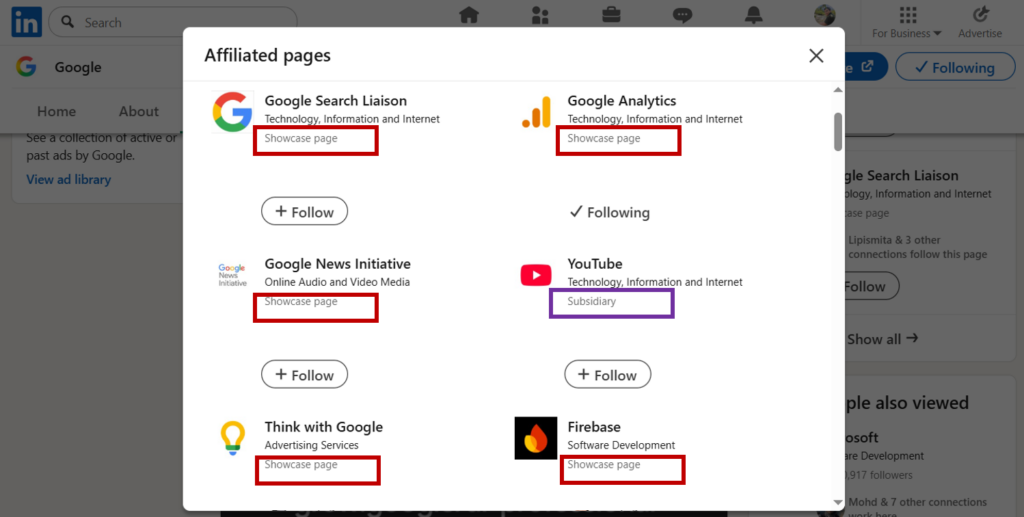
Here is a case in point for Google LinkedIn page that has a host of Subsidiary (marked in a purple colored rectangle) and Affiliate pages (marked in red colored rectangle):
They look identical to a visitor. But they work differently beneath the surface — different admin rights, different employee association, different governance logic entirely.
When Google lists Google Analytics, Think with Google, Firebase on its LinkedIn profile, those are Showcase Pages- deliberate audience segments, built to serve specific professional communities and maybe separate teams to handle those pages. However, Google acquired Youtube in 2006 for $1.6 billion and so on. Thus, separate companies with their own histories that google acquired. Those Affiliate pages are called Subsidiary pages.
Here is a little bit about how LinkedIn Algorithm works…
Why should you care about LinkedIn Showcase pages?
The structure you choose determines who owns the page, what content belongs on it, whether employees can associate their profiles with it, and how followers and analytics are counted. Getting this wrong early creates page architecture that is slow and costly to untangle — dormant pages, duplicated audiences, unclear ownership, and a profile that looks cluttered to anyone who looks closely.
Before building anything new, the more useful first step is a simple audit:
- Pull up your company’s LinkedIn profile.
- Look at every page listed.
- Identify which are Showcase Pages and which are Subsidiary Pages.
- Note when each one last posted.
- Ask who, if anyone, is actively managing each one.
What you find will tell you more about the state of your LinkedIn presence than any follower count will. And it will make the decision of what to build next considerably clearer.
Author







Thanks for sharing! This clears a lot of air around showcase and subsidiary pages.
Very complicated blog but author has explained very well and differentiated both showcase and company page with great ease. The blog enhances the utility of linkedin with an additional dimension and hence linkedin administrator ought to be grateful to the Blog author. Ambuj keep it up.
Very informative post about LinkedIn Showcase Pages. It’s a great way to highlight specific products or content streams while keeping the main brand page more general.
Interesting observations. I don’t pay attention to LinkedIn company accounts because I go to their websites instead. That said, your points are noted and important.
This is such a great breakdown and honestly something a lot of companies overlook. You explained really well why one Company Page can’t speak to every audience effectively. The idea of using Showcase Pages to target specific groups makes so much sense, especially for engagement and relevance. Definitely something more brands should be paying attention to.
This post does a great job of clearly breaking down a topic that often confuses many LinkedIn users, especially when deciding how to structure their brand presence. I really like how you highlight that a Company Page acts as the main hub for a business, while Showcase Pages allow for more targeted messaging to specific audiences or product lines, which can significantly improve engagement when used strategically. It’s a practical and insightful guide that helps businesses think more intentionally about how they present themselves and connect with the right audience on LinkedIn.
My understanding of LinkedIn is very basic and so is what I have currently set up. I had no idea a showcase page existed but it would be a fantastic way to demonstrate that I have a number of areas of expertise that may be of value to a range of clients.
I never paid much attention to the LinkedIn Showcase Page, but I need to revisit it. I have a few companies, so I think that is why I didn’t entertain it before. Or at least go back and do more on the page.
I know that LinkedIn will help us to look for colleagues and work and that is the best part for to get to know people in the same field.
I didn’t know there were showcase pages! I don’t do a lot of my social media work, though, so I am going to have to pass this on to make sure my team is doing this properly!
Managing those different audiences on one page sounds like a recipe for constant confusion. I like how you explained the branch office comparison. It makes the technical setup between parent and child pages much clearer.
Wow, I had no idea that LinkedIn offers this feature now. We’ve honestly been neglecting our LinkedIn pages, so I think this is a good sign that it’s time to update them. Thank you for sharing this. I definitely learned something new today.
This is such a helpful breakdown. It can be confusing to understand when to use a company page versus a showcase page, and you explained it really clearly. Great resource for anyone managing a brand on LinkedIn.